

Executive Summary
- Project managers can strategically use AI-powered programs to reduce their administrative workload while improving clarity, speed, and communication.
- Task management, scheduling, real-time note-taking, email summarization, and document change tracking are the most noteworthy use cases for AI in project management.
- When integrating AI into daily workflows, project managers should start small, rely on prompt templates, disclose AI usage, and maintain consistent human oversight.
- While AI project management tools can significantly enhance efficiency, they shouldn’t replace a project manager’s expertise, as unchecked usage can lead to errors that could disrupt projects.
The Growing Potential of AI for Project Management
A project manager (PM) is often responsible for juggling timelines, deliverables, documentation, and communication to ensure projects come to fruition. The expectations placed on PMs are only growing, especially at marketing agencies and fast-paced service organizations, as clients demand faster turnaround times, more transparent communication, and fewer errors.
Thankfully, artificial intelligence (AI) tools can help with some of a PM’s administrative responsibilities, such as writing meeting summaries, tracking document changes, and ensuring interdepartmental alignment. So much so that 98% of professionals in this field believe AI is becoming an essential tool for project management workflows—as a seasoned PM, I wholeheartedly agree.
I have been able to navigate increasing project complexity and compressing timelines by using built-in AI features found in project management workflow software, and I’ve gathered a few helpful takeaways. In the guide below, I’ll share some practical, low-risk ways to integrate AI project management tools into workflows to enhance productivity while maintaining control, accuracy, and accountability.
The Current State of AI in Project Management
AI has already found its way into many project management workflows, sometimes without PMs even realizing it. Many teams are using AI-powered features to support task management, scheduling, communication, and documentation to save time and improve clarity.
Some examples of tasks that once took hours that can now be completed in minutes, thanks to AI project management tools, are:
- Summarizing lengthy discussions
- Reviewing document revisions
- Tracking action items
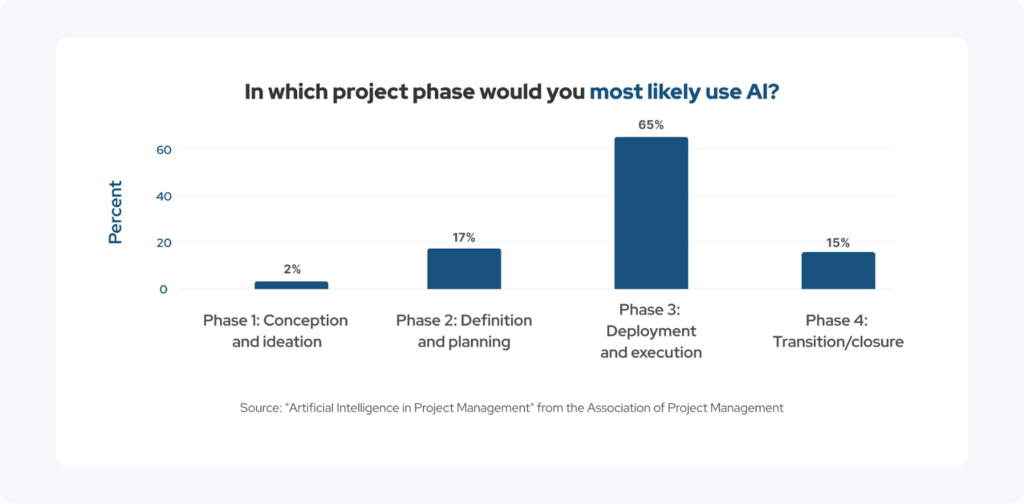
About 65% of project professionals believe AI is most helpful during the deployment and execution phases of project management, rather than during ideation, planning, or closure. This statistic supports the idea that AI can excel at supporting day-to-day execution work that keeps projects on track, but it should not replace strategic thinking.
I firmly believe AI should always be positioned as an augmenting tool rather than a replacement for PM expertise. My day-to-day responsibilities still require judgment, prioritization, emotional intelligence, and stakeholder management that AI cannot provide.
Top 3 Use Cases for AI in Project Management
While AI can support many aspects of project delivery, I have found that the three use cases below consistently deliver the most value.
1. Let AI Capture Real-Time Notes During Status Calls
Status calls are an essential part of many organizations’ day-to-day, but documenting them accurately can be time-consuming and pull PMs away from more pertinent tasks. Fortunately, AI tools like Gemini can record and summarize meeting content during video chats, which has saved me from getting buried in notes.
Some of the main benefits I have noticed are:
- AI-generated summaries produce clearer meeting minutes
- Fewer missed action items
- Improved alignment across teams
Decisions, risks, and next steps have all been easier to track when they’re consistently and thoroughly documented.
Since Gemini is already built into Google Meet, AI-powered note capture is seamless. This reflects a broader trend that I will hit on later in this article: many tools that teams already use now include embedded AI capabilities, so there is rarely a need to adopt entirely new platforms.
Pro tip: To achieve optimal results, PMs should provide context to the AI, such as project goals, team roles, and the meeting’s purpose. This extra input can help AI tools generate summaries that are more accurate and relevant.
2. Turn Email Overload Into Quick, Actionable Insights
Email tasks remain one of the biggest productivity drains in project management workflows. In my experience, long threads, multiple stakeholders, and unclear decision points have slowed progress and increased the risk of miscommunication.
Recently, I have been using AI to condense lengthy email chains into short, digestible summaries. Some elements these summaries may highlight are:
- Key decisions
- Open questions
- Timeline changes
- Action items
These highlighted components can be especially useful for technical discussions, vendor negotiations, or approvals involving multiple departments.
Many PMs also use AI to draft responses, having the software generate a first pass before introducing human oversight by reviewing, refining, and personalizing messages before sending them.
3. Use AI to Recap and Compare Recent Document Changes
Reviewing updated scopes, specifications, or statements of work is another time-consuming aspect of project management that AI has been able to streamline. Rather than manually comparing document versions, which raises the likelihood of missing critical changes, consider using AI to highlight added, removed, or rewritten sections. In turn, this can speed up approvals and reduce unnecessary back-and-forth.
Is AI Already Incorporated Into Your Day-to-Day?
Many PMs are surprised to learn that AI is already embedded in tools they use every day. For example, popular platforms like Asana and Slack have introduced built-in AI features that quietly enhance efficiency.
Asana’s AI helps summarize tasks and projects, generate task descriptions, and suggest updates or next steps. Similarly, Slack’s generative AI summarizes channels and threads and improves search by surfacing relevant messages faster.
Both these tools demonstrate that AI for project management isn’t always about adopting something new; it’s often about using existing features more intentionally. Nevertheless, I have found that thoughtfully layering in additional AI tools can further enhance productivity.
How to Integrate AI Into Your Daily Workflow Without Disruption
To successfully implement AI, PMs should start small. Don’t overhaul your entire project management workflow; instead, focus on changing repetitive, low-risk tasks, such as meeting summaries or email digests, one at a time.
Creating repeatable prompt templates is another helpful practice during initial implementation stages. I have noticed that consistent prompts lead to consistent outputs, making AI more reliable and easier to scale across projects.
It’s also critical to clearly define when AI should assist and when human review is required. AI project management tools can be great for drafting, summarizing, and organizing, but PMs should always own final decisions, approvals, and communications.
Transparency matters as well. Therefore, PMs should inform their teams how AI is being used so expectations remain clear and trust is maintained. Disclosing AI usage can also let team members know when to take things with a grain of salt.
Helpful AI Tools Project Managers Use
AI for project management is constantly evolving, but as of right now, there are a select few AI project management tools that stand out for specific use cases, including:
- Gemini is built into Google programs, including Meet and Docs, making it effective for drafting meeting summaries, quickly comparing documents, and contextual note-taking
- ChatGPT has powerful generative capabilities with a simple user interface, rendering it great for drafting emails, summarizing threads, and outlining documentation.
- Asana AI is perfect for compiling task summaries, delivering project updates, and offering workflow recommendations.
- Slack AI can provide digestible channel summaries along with search and conversation insights.
Each tool supports different stages of the project management workflow, and the best results come from matching tools to specific needs rather than using AI everywhere at once.
Applicable Project Types
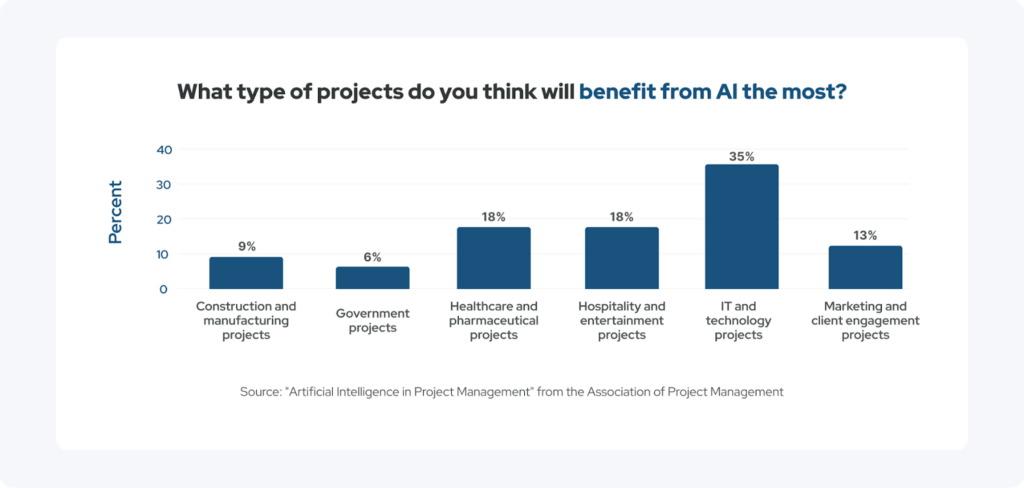
While many industries benefit from AI-enhanced workflows, information technology (IT) projects tend to see the greatest benefits. This is because they are often more complex, have greater documentation requirements, and require faster iteration cycles than other fields.
Still, other fields, such as healthcare, hospitality, and marketing, also see substantial benefits, particularly where communication volume and documentation demands are high.
Risks, Limitations, and Ethical Considerations
AI is powerful, but it’s not foolproof. PMs should always verify AI-generated content for accuracy and context, especially when it is being used to inform decisions or external communication.
Privacy is another key concern of AI for project management. Since sensitive or proprietary information should be handled carefully, PMs should research how the AI tools they use store and process data.
AI can support decision-making, but human judgment remains essential. AI cannot replace accountability, empathy, or strategic reasoning. So, every organization should establish internal guidelines for responsible AI use to help ensure consistency and trust.
Look at AI as a Partner Rather Than a Shortcut
When used thoughtfully, AI project management tools can save time, improve clarity, and strengthen execution without undermining PM authority. Still, it is essential to remember that AI for project management works best when treated as a partner rather than a substitute for human oversight, as mentioned above.
If your organization still needs help orchestrating and executing marketing-related projects after implementing some of the tips mentioned in the guide above, consider getting professional, human help from an experienced digital marketing agency like collystring.
Our team can handle everything from paid social ads to net-new site launches, ensuring projects are completed on time and in accordance with your brand’s goals.
Contact collystring to learn how we can help with all of your digital marketing needs.