

Executive Summary
- Brands must ensure their websites are efficient, fast-loading, and accessible to meet user expectations and enhance SEO performance in 2026.
- Many site performance issues stem from common yet avoidable problems, such as oversized images and videos, excessive scripts, and inefficient or outdated code.
- Developers should conduct performance audits, then use caching and image compression tools, Content Delivery Networks (CDNs), semantic HTML, and clean coding practices to optimize their site.
- Partnering with an experienced digital marketing and web development team can help brands avoid technical debt, poor User Experience (UX), and long-term SEO setbacks.
The Importance of Site Performance in 2026
User expectations for website speed and responsiveness have been rising since the internet’s inception. In 2026, site optimization is more critical than ever, as even minor delays can significantly impact engagement, conversions, and brand perception.
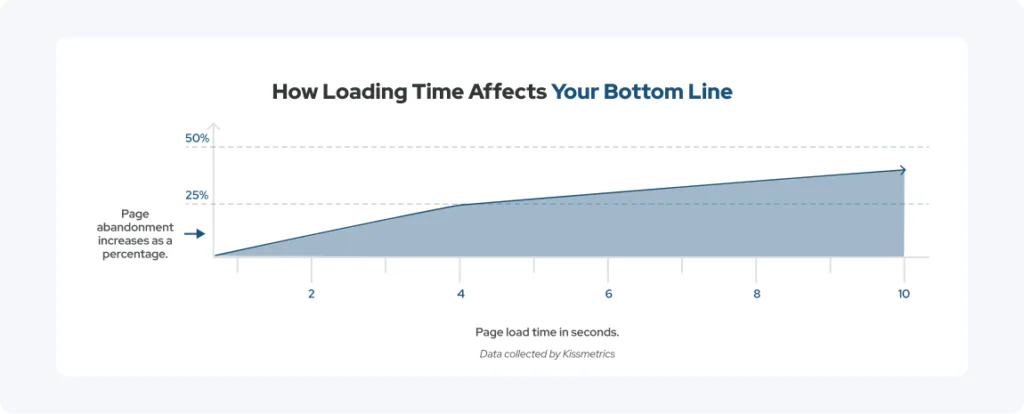
Forty-seven percent of users expect websites to load in two seconds or less, and when load times stretch to six to ten seconds, many of those individuals will abandon the site entirely. With every second of delay translating into lost traffic, missed leads, and reduced revenue, fast websites triumph in today’s digital age.
In addition to affecting bounce rates and conversions, site performance metrics influence search engine rankings. For example, Google’s emphasis on Core Web Vitals and UX-driven ranking signals often rewards a faster website with better visibility in search results.
Therefore, by focusing on site speed optimization, developers can support search engine optimization (SEO) performance and business outcomes. To help with this, I have compiled a list of practical, modern techniques that have helped me build faster, more reliable, and accessible websites, from image compression and caching to semantic HTML and cleaner codebases.
The Current State of Website Performance
Even in 2026, many websites are still plagued by performance issues that quietly undermine their effectiveness. Some of the biggest culprits of slow load times and frustrating user experiences are:
- Media-heavy pages
- Third-party scripts
- Overbuilt frameworks
Issues like the ones above can slow a website and degrade its aesthetics to the point of driving visitors away.
In my tenure as a web developer, I have found that most performance problems aren’t caused by a single bad decision, but by a series of small, incremental ones that add up over time. When considered individually, a new plugin, a high-resolution image, or a hastily added third-party widget may seem harmless, but collectively, they can tank site performance metrics.
By regularly testing their site, developers can identify issues and address them before they compound. Usually, the issues they uncover fall into one of the categories mentioned in the section below.
Common Pitfalls That Undermine Site Performance
One of the biggest overarching mistakes brands make is prioritizing visuals or features over site speed and usability. When performance is neglected, technical debt accumulates, increasing the future cost and effort required to fix suboptimal code and website architecture.
Below are some of the most common issues developers come across when auditing slow or underperforming websites.
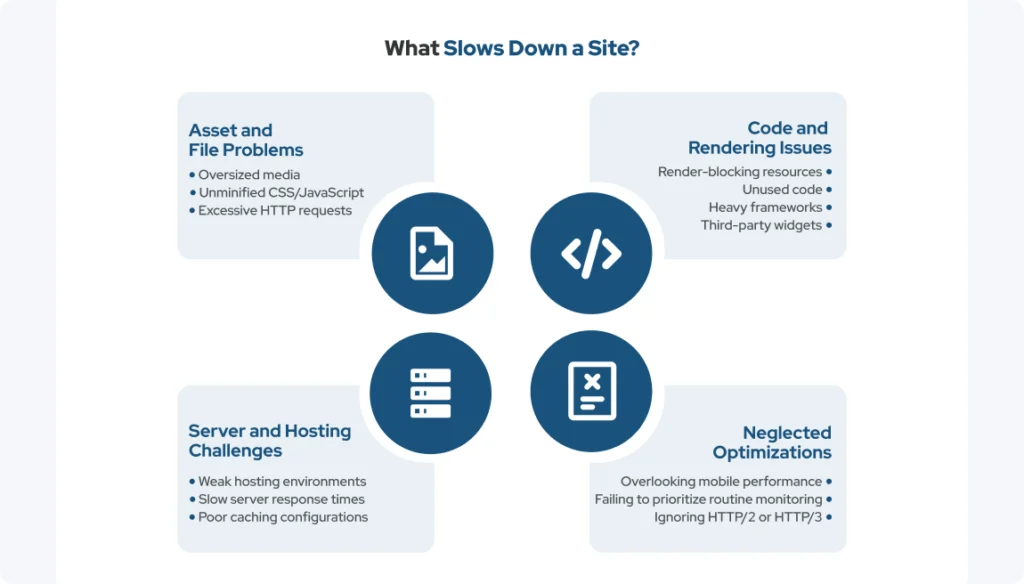
| Potential Site Speed Hinderances | |
| Asset and File Problems | Code and Rendering Issues |
|
|
| Server and Hosting Challenges | Neglected Optimizations |
|
|
In my experience, proactive decision-making during development has been far easier and less costly than fixing performance issues after a site goes live.
Identify Your Performance Baseline with Google PageSpeed Insights
If you are unsure whether your site is affected by the issues mentioned in the section above, Google PageSpeed Insights can help you pinpoint where it stands. This free web developer tool analyzes page performance and provides actionable suggestions to optimize site speed and improve UX.
To provide a comprehensive view of your site performance metrics, PageSpeed Insights combines simulated load data from the Google Lighthouse lab data with real-world user data for analysis. It then delivers a 0-100 score and highlights key metrics, such as Core Web Vitals, to illustrate how users experience your site.
What Makes Up Google’s Core Web Vitals?
Some specific site performance metrics that are a part of Core Web Vitals are:
- Largest Contentful Paint (LCP) – Gauges loading performance by how long it takes for the biggest visible element, such as a hero image or main headline, to show up. A good LCP means users can see important content quickly.
- Interaction to Next Paint (INP) – Measures responsiveness by assessing how quickly a site responds to user interactions, such as clicks or key presses, across the entire page lifecycle. Lower INP indicates the site is fast and responsive.
- Cumulative Layout Shift (CLS) – Tests visual stability by tracking unexpected layout shifts while the page loads. A low CLS ensures that elements remain where users expect them, reducing frustration from accidental clicks.
Together, the metrics above help quantify how fast, responsive, and stable a website feels to real users. So, the information PageSpeed Insights provides on Core Web Vitals can be critical for both UX and SEO.
Top 5 Performance Optimization Techniques Developers Should Prioritize
In my work this year, the five techniques below have consistently delivered the most significant performance gains. These potential solutions are also among the most common site-optimization suggestions from Google PageSpeed Insights.
1. Improve Speed with Caching and Compression Plugins
Using caching and compression plugins is one of the quickest and most effective ways to create a faster website. They work in the respective ways:
- Browser and server-side caching – Reduces the need to repeatedly download assets by temporarily storing copies of frequently accessed data in a high-speed, localized location, such as RAM or a local disk.
- Image compression – Further lowers page weight without sacrificing visual quality using an algorithmic process that reduces a graphic’s file size by removing redundant and less critical data.
At collystring, we primarily rely on WP Rocket for caching, which has streamlined our optimization workflows and delivered noticeable performance gains. Tools such as W3 Total Cache are also popular for managing caching and performance settings. For image compression, I frequently use ImageCompressor.com and plugins such as Smush.
The key is incremental testing: introduce changes, such as new plugins, gradually and measure their impact to avoid unintended consequences.
2. Use CDNs for Faster Global Performance
As their name suggests, Content Delivery Networks (CDNs) distribute content across geographically dispersed servers, so that assets are delivered from locations closer to users.
Some common types of content CDNs can deliver are:
- Static files that do not change from user to user, such as website logos, CSS stylesheets, JavaScript files, font styles, and HTML documents
- Dynamic content generated for specific users or contexts, like personalized web pages and Application Programming Interface (API) responses
- On-demand and live-streaming video or audio content
- Software and large downloads, like application binaries and software patches
- E-commerce and web application data, such as product images, user profiles, and shopping cart details
CDNs are especially valuable for high-traffic sites with international audiences, as they reduce server strain, improve reliability, and often enhance security. Pairing CDNs with caching and asset optimization has been a game-changer in my own workflow.
3. Reduce Code Bloat Through Clean Development Practices
Unfortunately, I have seen many instances of unused CSS, JavaScript, and libraries silently degrading site performance without other developers realizing it. Therefore, it is essential to perform regular audits to help identify unnecessary code.
After the audit, you can go back and reduce bloat, making codebases lean and maintainable. Modular development practices are key to long-term performance, as they make sites easier to scale while preserving speed.
4. Use Semantic HTML for Faster Rendering and Better Accessibility
Properly structured HTML elements improve browser parsing and rendering efficiency, speeding up front-end load times. Developers should rely on semantic elements like:
- <button>
- <nav>
- <section>
These semantic elements provide structure and meaning that generic <div> containers lack. In turn, they support accessibility tools, improve SEO, and result in more efficient rendering.
5. Balance Animations With Performance and Accessibility
As you have probably seen, animations are everywhere in 2026, and for good reason; they add a fun dynamism to sites. However, excessive motion can degrade performance and accessibility.
Developers should avoid heavy animations, as they increase load times and can cause discomfort for motion-sensitive users. Instead, opt for purposeful, lightweight animations to add polish without compromising speed.
It is also a good idea to give users control over motion effects to further balance visual appeal, performance, and accessibility.
Build Performance Into Your Development Workflow
To avoid technical debt, performance testing should happen during development, not just after launch. The earlier you catch issues, the easier it is to prevent costly fixes later.
Pro tip: avoid adding last-minute features or unvetted plugins, as these often introduce unoptimized code, extra database queries, and unnecessary HTTP requests.
Nevertheless, site performance remains an ongoing responsibility well after launch. Integrate checks into Continuous Integration/Continuous Delivery (CI/CD) pipelines to help ensure site speed remains consistent as updates roll out. Collaboration between developers, graphic designers, and SEO professionals can further reinforce a performance-first approach and improve UX and search visibility.
Prioritizing Performance-First Development in 2026 and Beyond
In 2026, developers must focus on speed, efficiency, and maintainability to give their websites the highest chance of success. With the site optimization techniques mentioned in this guide, you can achieve better UX, stronger accessibility, and improved SEO outcomes.
Leading with a performance-first mindset, I’ve been able to boost PageSpeed scores by 20 to 40 points by leveraging WP Rocket, image compression, and selectively disabling unnecessary features, such as RSS feeds or emoji support, when they aren’t needed.
If your brand needs help building or maintaining a faster website, collystring is here to help. Our team partners with various organizations to create high-performing, accessible sites while avoiding technical debt.
Set up a discovery call with collystring to learn more about site performance metrics and see how we can support your web development and digital marketing goals.