

Executive Summary
- Title tags are the clickable headlines that appear on search engine results pages (SERPs); they play a large role in search rankings and click-through rates (CTRs).
- In an attempt to improve the user experience, Google frequently rewrites or truncates title tags in SERPs, which can hinder SEO value, making post-index review vital.
- Brands should review how title tags appear in SERPs whenever they submit new pages for indexing, make major content updates, or notice a drop in CTR.
- Using advanced search operators like
site:andintitle:can make it easier to pull up titles as users see them, rather than how they appear in HTML.
Title Tag Auditing is Still Vital to Modern SEO
The webpage headlines you see on a search engine results page (SERP) are called title tags. They are critical to search engine optimization (SEO), as they play a central role in keyword relevance, search rankings, and click-through rates (CTRs).
A common misconception is that whatever you include in the HTML <title> element is how your webpage will show up on the frontend, but the reality is that even if you craft a perfectly optimized title in your content management system (CMS), Google may rewrite it, influencing how your page is displayed, interpreted, and interacted with.
So, relying solely on source code or CMS exports for title tag review may be misleading. Instead, brands should scrub through live SERPs to see how real users are seeing their pages. As you review website content, it can be easier to catch rewrite-related issues, such as truncated title tags, using advanced search operators like site: and intitle:.
This guide outlines advanced search techniques and other ways you can facilitate title tag content audits and turn results into measurable SEO improvements.
Why Are Title Tags Important?
Title tags are an essential SEO element because they serve as a ranking signal, helping search engines understand topical relevance, and they double as a marketing headline, giving searchers a taste of what is inside. When users scan search results, the title tag is often the first thing they read and the determining factor in whether the page deserves a click.
The top three benefits brands experience when their title tags are optimized effectively include:
- Improved visibility
- Strong keyword alignment
- Increase CTRs
Given that they influence both rankings and user behavior, title tags should be closely monitored, especially since Google can manipulate how they appear in SERPs.
Understanding Google’s Impact on Title Tags in SERPs
One of the biggest misconceptions in SEO is assuming the HTML <title> element is always what users will see on the frontend. Unfortunately, there are often discrepancies between the two because Google rewrites approximately 65% of desktop titles and 62% of mobile titles for SERPs, trying to improve the user experience, but inadvertently undermining many webpages’ SEO value.
Some common reasons Google modifies title tags are:
- If the title is too long or keyword-stuffed
- If there is a brand name on a non-homepage title
- If the title is not relevant to the on-page content or search intent
- If it excessively uses separators or symbols, such as brackets [ ] or pipes |
- If the title features low-quality, boilerplate phrasing
- If there are inconsistencies with capitalization or formatting
In my experience, whenever Google rewrites a title, it often pulls it from the page’s H1 in an attempt to solve the problems mentioned above.
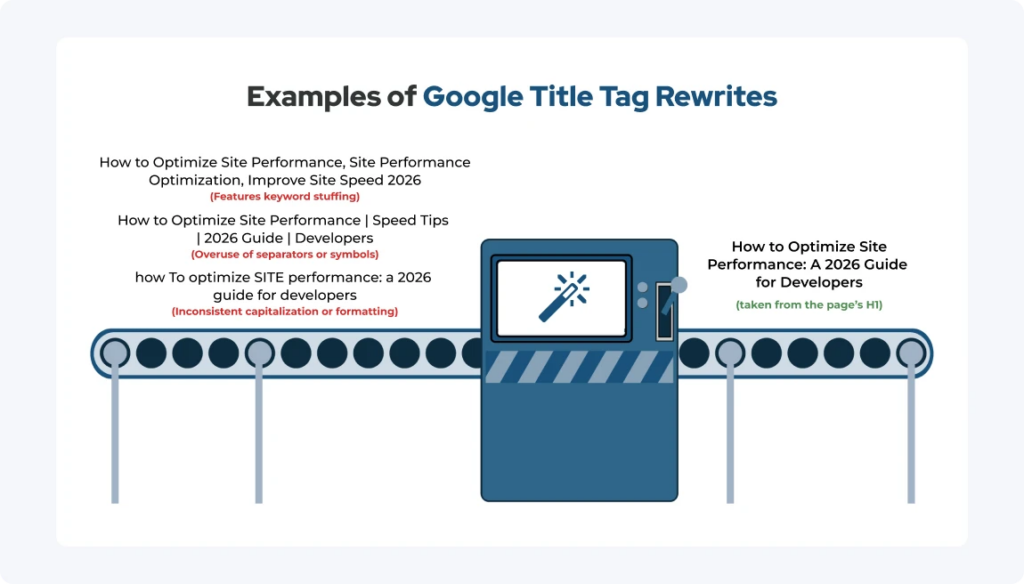
The Pixel Width Problem
In addition to general rewrites, truncated title tags are another issue I have had to navigate while working in organic search. If a title exceeds the available display width, Google truncates it. This usually does not directly harm search rankings, as Google still considers the full text for ranking purposes. Still, it can lower the page’s CTR by hiding crucial information or value propositions from users.
When writing titles, I try to keep them to 50–58 characters as a general guideline. However, it is important to note that Google does not strictly truncate based on character count; it does so based on pixel width. So, you should keep in mind that wide characters, such as W or M, take up more space than narrow ones, like i.
Truncated title tags are another reason post-indexed review is critical—without checking live SERPs, you may never notice missing information.
The Limitations of Traditional Title Tag Reviews
Many SEO teams conduct content audits within a CMS, via a spreadsheet export, or with a crawl tool. While those methods can be useful, they can also be misleading.
For example, you might see a perfectly formatted 55-character title in your crawl report and assume it’s bound to perform well, but on the frontend, users see an altered version that lacks key context.
So, even though SEO tools can simulate titles, for a complete website content review, you must audit titles directly in search results, and you should do it often.
When and How Often to Review Title Tags
Four circumstances that can warrant a content audit focusing on title tags are:
- If new pages are published
- If there are major content updates
- If there have been algorithm updates
- If you notice substantial CTR drops
A content audit title tag process should be ongoing, not a one-time effort. Also, high-value pages deserve more frequent review.
At first, title tag auditing in live SERPs may sound like a time-consuming process and hard to implement as frequently as mentioned above, but I have been able to expedite this approach by leveraging advanced search.
Using Advanced Search to Audit Title Tags in the SERPs
Google’s search index features hundreds of billions of webpages, which can make it hard to locate the specific pages you are looking for when performing your website content review, especially when their title tags differ from what you expect.
Thankfully, you can facilitate your title tag content audit by typing advanced search operators into the Google search bar to narrow the results. Below are the commands I find most helpful for auditing title tags in live SERPs.
| Best Advanced Search Operators for Title Tag Auditing | |||
| Advanced Search Technique | Example of the Technique | What It Does | Best Use Case |
site: with optional keyword modifier | site:https://collystring.com optimization | Reveals how Google displays title tags for a specific site | Spot-checking priority pages after indexing to identify truncated title tags or rewritten ones with omitted keywords |
| Exact-match quotes | “How to Optimize Site Performance“ | Confirms whether Google is using an intended title tag | Checking pages one at a time to find title rewrites based on on-page content or anchor text |
intitle: | intitle:“site performance” | Shows pages with specific keywords in their title tag | Uncovering weak optimization by confirming whether an SEO keyword is being used |
allintitle: | allintitle:site performance optimization | Only shows pages that have all of the included terms in their title tag | Assessing keyword saturation to gauge competitiveness |
OR | intitle:pricing OR intitle:cost | Uncovers title variations that Google is indexing | Standardizing wording and reducing inconsistency |
- (Minus operator) | site:collystring.com services –consulting | Isolates specific title structures by excluding certain terms | Narrow large search result sets by removing irrelevant pages |
* (Wildcard) | “How to * Site Performance” | Uses a fill-in-the-blank approach to identify title tag variations and rewrites | Auditing titles that follow a specific template |
filetype: | site:example.com filetype:pdf | Surfaces non-HTML assets with titles | Identifying indexable PDFs with poorly optimized or missing titles |
| URL-specific search | https://collystring.com/optimize-site-performance/ | Confirms how Google displays a single page’s title after indexing | Revealing how a rewrite was influenced by headings or internal links |
Google also offers a dedicated page for its advanced search engine, which can replace many of the operators above. It can also be used for filtering by region, language, and time. Nevertheless, I personally find operator-based searching faster and more flexible than using the dedicated page.
After updating titles, I recommend re-searching them in a few days or weeks to confirm whether Google has adopted the changes.
What to Look for When Auditing Title Tags in Search Results
Now that you know how to use advanced search, you need to know what to look for. During my title tag content audits, I ponder the following five questions.
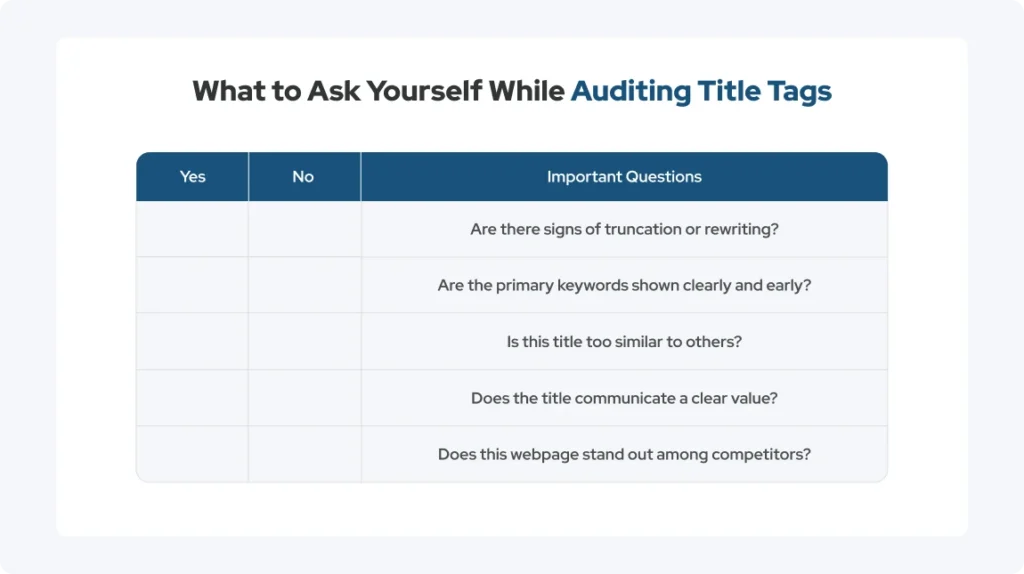
In addition to the questions on this checklist above, you should also examine brand placement, considering many CMS platforms automatically append brand names.
For exceptionally well-known brands, including the brand name in a non-homepage title may improve trust. However, I am generally against doing so for most websites, as brand names are often truncated or rewritten for smaller brands anyway. Regardless, I believe that character space is better used for keywords and value propositions.
Turning Title Tag Audits into Actionable SEO Improvements
Audits mean nothing without action. Three of the most important follow-up steps are:
- Record and analyze your findings
- Identify title tag rewrite patterns
- Revamp the content and titles of affected pages
When it comes to step 3, I’ve achieved measurable gains by making small title refinements, then testing and iterating. You should start with pages with high impressions but low CTR, working through the strategies below.
Optimizing Title Tags for Keyword Rankings
The golden rule of title tags is that they must align with search intent. To boost keyword rankings while minimizing the risk of rewrites, I categorize optimized titles into two formats, as seen below.
| Approach | Example | |
| Format 1 | Clear, separator-free, 50+ characters | How to Improve Title Tag Auditing with Advanced Search |
| Format 2 | Concise with a separator and secondary value | Title Tag Auditing Guide | Advanced SEO Techniques |
In my time as a senior manager of organic search, I have seen natural language outperform keyword stuffing time and time again, making it important to write for users first.
Optimizing Title Tags for CTRs
Search rankings are all about visibility, while CTR is about driving traffic. Prioritize clarity over cleverness to help differentiate your titles from competitors. As you increase your CTR, you may also notice a stronger overall SERP performance.
The table below features some strategic modifiers you can use to help your brand stand out and increase its click-through rate.
| Modifier | Example |
| Years in parentheses | How to Improve Title Tag Auditing with Advanced Search (2026) |
| Benefit-driven phrases | Improve Title Tag Auditing to Save Time on SEO tasks |
| Qualifier | A Complete Guide for Improving Title Tag Auditing |
You should use the Click, Impression, and CTR data from the Google Search Console to see real queries triggering your pages. Oftentimes, these digital analytics reveal the benefits of secondary keywords or alternative phrasing.
Strengthening SEO Performance with Ongoing Title Tag Audits
Through SERP-based auditing, you can make more accurate, user-focused SEO decisions. Advanced search techniques have helped me bridge the gap between on-page SEO and real-world visibility. They have helped me pinpoint missed opportunities due to rewrites and truncated title tags.
At collystring, we help brands conduct comprehensive website content review processes that include title optimization, keyword strategy, technical SEO, and performance tracking. So, if your titles aren’t earning the clicks they deserve, our team can help.
Connect with collystring to strengthen and improve your brand’s search visibility and build long-term SEO momentum.