

Key Takeaways
- The mission – Close performance gaps, fix user experience issues, update outdated aesthetics, and align with evolving business goals.
- Our approach – collystring invites each client to a discovery call to align on strategy, maps out the new website with a wireframe, and adapts to client feedback before fleshing out the final product.
- The result – Improved navigation clarity and accessibility, stronger conversion pathways, and faster load times, all of which support long-term digital marketing performance.
Website Redesigns are an Integral Part of Digital Marketing
Does something feel off about your website? Maybe you’ve noticed that your layout looks outdated compared to competitors, your visual assets are taking too long to load, or you have a disproportionately low conversion rate relative to website traffic—these are common signs you need a website redesign.
Many organizations can instinctively recognize that their site needs attention, but they may be unsure where to begin. Even if they have a rough idea, knowing how to redesign a website is only half the battle; the follow-through requires a careful blend of visual design and web development, backed by search engine-optimized content writing and detailed performance data.
collystring’s small yet well-rounded digital marketing team is a one-stop shop with everything you need to redesign a website. To give you a peek into our calculated approach, we will break down why we’d redesign a website for one of our partners and walk you through our process at a high level.
Knowing When It Is Time to Invest in a Website Redesign
At collystring, redesign decisions are not just driven by temporary graphic design trends. We believe a modern redesign should solve real problems, not simply refresh colors or fonts for the sake of change. Three of the most notable reasons we would recommend redesigning a website are:
- To boost performance
- To increase usability
- To better align with the brand
As collystring’s senior graphic designer, I work closely with other members of our team to evaluate whether a site is still effectively supporting a brand’s goals. Over time, we have developed a simplified checklist to help us determine when redesigning a website may be necessary.
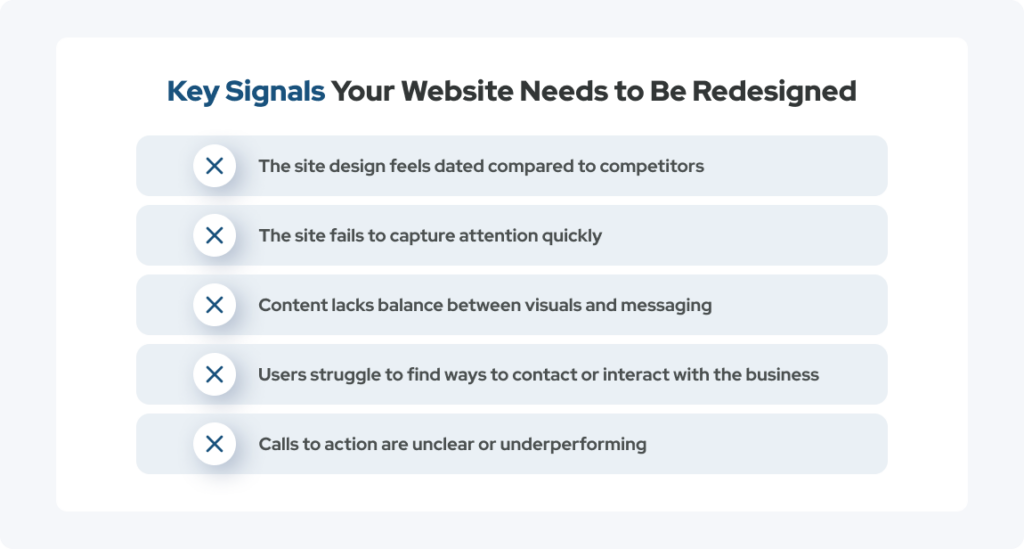
How Often Should a Website Be Redesigned?
Many businesses undergo a full website redesign every few years, but the ideal frequency for your site will likely depend on how many warning signs are present. Having multiple site issues can indicate larger structural or strategic limitations that are gradually weakening your site’s effectiveness.
To start uncovering these deeper issues, we ask clients several foundational questions, including:
- When was the last time your website was updated?
- Does your current design reflect your brand today?
- Are users taking the actions you want them to take?
- Is your website’s content easy to navigate and understand?
The questions above spark conversations that help us determine not only whether a redesign is needed but also what it should accomplish strategically to support our partner’s business goals.
Our Philosophy: Put the Brand First
As we do with all of our services, collystring maintains a client-centered mindset when redesigning a website.
We understand that redesign projects can feel intimidating for businesses, especially when their current website represents years of work, branding decisions, and content development. That is why we focus on refinement rather than unnecessary reinvention.
A redesign need not erase elements that already work. We will always preserve valuable brand equity as we work to improve a site’s usability and structure, maximize the value of written content, and boost performance.
Ensuring Client Comfort
Maintaining client comfort throughout the redesign process is incredibly important to us—we want clients to feel informed, involved, and confident from the initial strategy conversation through the final launch.
To accomplish this, we use status calls and email exchanges to provide thorough updates and the highest level of transparency. We also rely on iterative feedback loops to gauge client satisfaction, marrying the brand’s subjective preferences with real, measurable outcomes.
Redesigning without Disruption
To further promote client comfort, collystring structures the rebuild process carefully to minimize disruption to the organization’s day-to-day operations. Once the redesigned site has been reviewed, finalized, and approved in a content management system such as WordPress, Webflow, or Shopify, the transition is usually seamless, with essentially no downtime for users.
Our Strategy for Website Redesigns
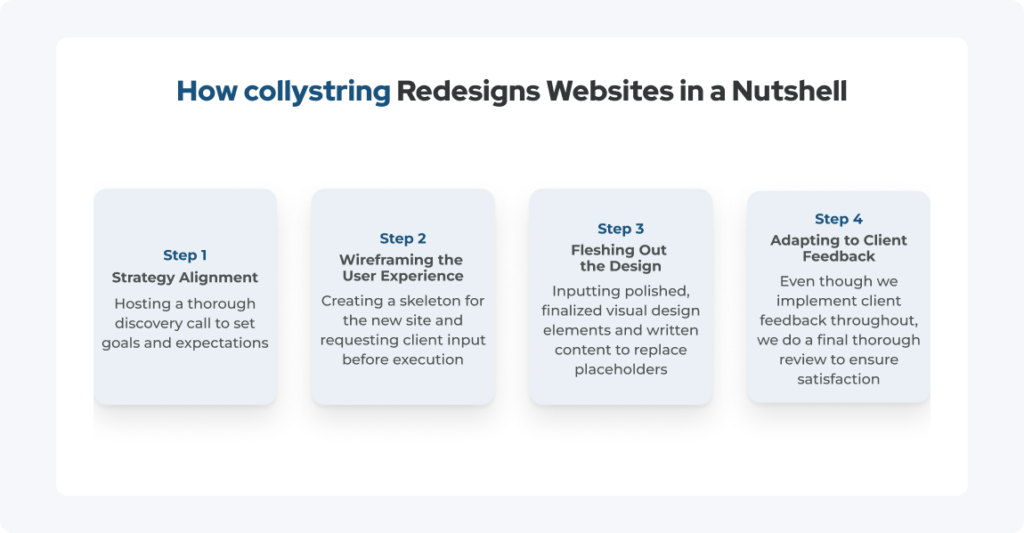
Each of the amazing brands we have helped improve has had unique goals, audiences, and technical requirements, so every redesign evolves slightly differently. Still, our overall framework typically follows these four major steps, which help us maintain alignment, efficiency, and clarity throughout the project.
Step 1: Discovery and Strategy Alignment
Every redesign begins with a discovery phase that combines conversation with digital analytics to set actionable goals for the website redesign.
This stage allows us to understand not just the website itself, but also the business behind it. We learn what is working, what is underperforming, and what the client hopes to achieve moving forward.
Some steps you can expect during this phase are:
- An initial discovery call to understand goals and pain points
- The review of the site’s current performance, structure, and content
- The identification of usability gaps and conversion barriers
After completing the items above, we will have a strategic foundation for everything that follows. Even though these early conversations ground the redesign in business objectives, the project continues evolving through feedback and collaboration.
Step 2: Wireframing the User Experience
Next, we create a simplified structural layout called a wireframe that will give the client and other members of collystring an idea of what the new site will look like, helping align both teams on things like:
- Hierarchy
- Navigation flow
- User experience
By showing all parties where content and each call-to-action (CTA) will go and how navigation and sitemap organization will be improved before heavy visual design work and content writing begin, wireframes can help us catch structural issues early and minimize the need for rework.
Figma Is Our Friend
I primarily build wireframes using Figma. This cloud-based collaborative platform makes sharing easy and helps me ensure visual consistency while wireframing websites—it is one of the most important tools in my graphic designer toolkit.
There is so much to love about Figma, but my favorite feature is its commenting system. Clients can leave feedback directly on individual design elements; this level of specificity and user friendliness has dramatically improved communication and eliminated ambiguity during revisions.
Step 3: Executing the Visual Design
Once the wireframe has been approved, we move into the visual design phase, where we flesh out the skeleton created in step two with more polished elements like:
- High-quality imagery
- Engaging animations
- Real content replacing the Lorem Ipsum placeholders
During this step, I may also tweak padding and spacing, add micro-interactions such as hover effects, and ensure the color palette and typography align with brand guidelines.
Main Objectives of Visual Design
Ultimately, my goal is to use strong visual design to accomplish these four things:
- Guide users through the site naturally
- Reinforce brand identity
- Encourage action
- Make everything on the site feel cohesive
I always work hard to create visually engaging, modern designs that reflect the energy and needs of the brand we are working with. Nevertheless, all of our decisions are grounded in usability and performance, not just appearance.
Step 4: Client Feedback and Iteration
Even after a client reviews and approves the wireframe, they can still expect things like:
- Structured feedback cycles
- Clear communication regarding any changes
- Insight into our rationale
At any stage, we will happily make adjustments based on client input, while maintaining best practices. Iteration is not a sign of problems within the process; it is actually a key part of what makes our approach so effective.
After step three, we send the draft of the finished site for a more thorough, conclusive review. If needed, we refine the visual elements, functionality, and content accordingly and resubmit for approval before scheduling the site’s launch. As a result, our partners can rest easy knowing that the final website reflects both their vision and the user’s needs.
Improvements We Make to Clients’ Sites
Throughout every redesign project, we keep overall site performance at the forefront of our decision-making. Although every site differs, the areas for improvement mentioned below consistently matter most.
Refining Navigation and Site Structure
Arguably, one of the biggest advantages of redesigning a website is the opportunity to improve organization and usability. To help our partners capitalize on this, collystring often optimizes top navigation and simplifies user journeys by creating clearer pathways to key pages and actions.
Once the navigation is cleaner and more intuitive, users will be able to find information faster and move through the site more naturally. Better organization also supports search engine optimization (SEO) by improving crawlability, meaning search engines can understand the site hierarchy more effectively.
Upgrading Performance, Speed, and Technical Aspects
Optimizing site performance is another major focus area during redesign projects. Unfortunately, we have seen many older sites gradually accumulate site-slowing and usability-degrading issues like:
- Bloated code
- Oversized assets
- Outdated plugins
When we redesign a website, we remove inefficient structures to reduce page weight, expedite load times, and improve overall efficiency. Getting rid of something as simple as a large, uncompressed JPEG or a video that plays automatically in the background can deliver a smoother user experience and reduce bounce rates.
Enhancing Accessibility Through Inclusive Design
collystring views accessibility as both an ethical responsibility and a practical business advantage because making your website more accessible benefits all users —not just people with disabilities. Clearer structure, stronger contrast, better navigation, and more intuitive interactions create a better experience across the board.
To enhance accessibility while redesigning a website, we focus on things like:
- Text contrast and readability
- Screen reader compatibility
- Interaction clarity and usability
Doing so helps us satisfy the standards set by the Americans with Disabilities Act (ADA) and the Web Content Accessibility Guidelines (WCAG).
What Long-Term Performance Can Look Like Post-Redesign
In my opinion, one of the most rewarding parts of redesign work is seeing the measurable impact after launch. Five of the most common outcomes we observe include:
- Improved navigation clarity and sitemap organization
- Higher conversion rates, thanks to the stronger CTAs
- Faster performance and stronger technical scores
- Better usability and compliance with accessibility standards
- Happier clients who prefer the updated design and user experience
When you work with us to redesign a website, you’ll notice improvements that go beyond cosmetics. The redesign will influence how users interact with the business itself. When a site feels easier to use, loads faster, and communicates more clearly, it builds trust and creates a more seamless user journey.
Give Your Website the Attention It Needs
A website should be viewed as a living business asset, not a static project that remains untouched for years—brands evolve, user expectations change, and digital standards continue shifting. Eventually, redesigning a website becomes necessary to remain competitive and effective.
At collystring, we believe the best redesign projects balance creativity, strategy, collaboration, and performance. When we redesign a website, we make performance-driven design decisions, prioritize collaborative, low-friction communication, and focus on both user experience and business goals.
If your site is beginning to show some of the warning signs discussed at the start of this guide, schedule a discovery call with collystring today to take the first step toward a stronger digital presence.